CTRL GIANT
CTRL Giant is a polyphonic wavetable synthesizer for MPC standalone hardware. It plays up to 16 notes at once, and every note runs through its own oscillators, filters, insert effects and envelopes before the notes are mixed and finished with compression, EQ, stereo effects, stereo width and a loudness maximizer.
Want your presets featured in the official release, and your artist name credited within the plugin? Submit your presets! Preset submissions must be made using the stock wavetables.
A wavetable is a set of single-cycle waves, called frames, stored one after another. Instead of playing one fixed wave, a wavetable oscillator can move smoothly from frame to frame, so the tone changes as it plays. CTRL Giant comes with 70 built-in wavetables in seven lists, with a further 30 slots for your own.
- Oscillators: 3 Wavetable oscillators (with unison, 8 strength modes, AM, FM and PD modulation), Sub oscillator and Noise generator.
- Per-note processing: Two filters and two insert effects, with flexible routing.
- Mix processing: Compressor with soft clip, 4-band EQ, 2 stereo effects, high/low Width adjustment and MAXIMIZER.
- Modulation: 4 LFOs, 2 8-step Wavesteppers, 4 Envelopes, Velocity and Mod Wheel.
- CTRL Giant Wavetable Manager: Desktop app to add and organize your custom wavetables.
Version 1.5.1 is a public beta. Everything works, and reports from users like you are needed to help finish it. See Beta Testing for how to help.
Version History:
- 1.5.1: Pagination has been updated. Wavestepper animation has been improved.
- 1.5.0: Public beta release.
Installation
CTRL Giant is installed by copying its folder into VST2 Plugins on your device.
Copy the Plugin to Your Device
- Download the ZIP archive that matches your MPC:
- Extract the ZIP archive. It contains one folder named CTRL - VST - CTRL Giant.
- Connect your MPC to your computer with a USB cable.
- Put your MPC into Controller Mode: Tap the Controller Mode button. If your project has unsaved changes, the MPC asks whether to save them first.
- Open your file manager and locate the MPC User drive.
- If it does not already exist, create a folder named VST2 Plugins in the root directory of the drive. The name must match exactly.
- Copy the CTRL - VST - CTRL Giant folder into VST2 Plugins. Copy the folder itself, not just the files inside it.
- Safely eject the drive from your computer.
- On your MPC, tap Standalone to return to Standalone Mode.
Load CTRL Giant
CTRL Giant is an instrument plugin, so it goes on a plugin track.
- Open a project and create or select a plugin track.
- Click on the plugin placeholder.
- CTRL Giant will be found in the list under External Plugins.
Updating
Replace the CTRL - VST - CTRL Giant folder with the new version's folder. Delete the old folder from VST2 Plugins before copying in the new one.
Your own wavetables live in a separate folder, VST2 Plugins/CTRL Wavetables, and an update does not touch them. Projects saved with CTRL Giant keep their settings across updates from 1.5.1 on.
How the Screen Works
CTRL Giant has 13 pages. MPC shows five page tabs at a time; use the arrows to reach the rest.
banks and Q-Link Banks
Each page has up to four banks of knobs. A Q-Link bank is a group of four Q-Links that move four controls together, and each bank is one Q-Link bank, top to bottom or left to right in the same order as the knobs. Tthe 16 Q-Links cover a page's 16 main knobs.
The MPC draws a ring (an orange outline with a "Q" tag) around each Q-Link bank, so you can see what they will move before you touch them.
Selecting a Bank
Touching a knob brings its bank to the Q-Links. Tapping a section title, a button or a menu does the same for the bank it belongs to. For example:
- On FX, tapping the FX 1 menu selects FX 1's knobs.
- On the ENV pages, touching the envelope picture selects Attack, Decay, Sustain and Release.
- Tapping a target menu selects its depth knobs.
Titles Are On/Off Switches
Tapping a section's title (such as WAVETABLE 1, SUB, NOISE, etcetera) turns that section on or off. The background of the title changes to indicate its state.
Buttons, Menus and Greyed Controls
- Buttons are rounded: bright with white letters when on or selected, dimmed with darker letters when off.
- Menus open on a tap. Tapping outside an open menu closes it.
- Two-level menus: Target menus and Wavetable menus first list groups. Tap a group to see its contents, and tap the group name at the top to go back.
- Greyed controls: A control that can't be used in the current setting.
Signal Flow
Every note (voice) you play runs through its own copy of the first five stages:
Then all voices are mixed, and the mix passes through:
- Oscillators: Wavetable 1, Wavetable 2, Wavetable 3, Sub, and Noise.
- FILTER ROUTE: Each Oscillator picks Thru, Filter 1 or Filter 2. Thru bypasses the filters and the inserts.
- FILTER 1 and FILTER 2: Each filter is routable to Insert FX1, Insert FX2, or Thru. Filter 1 can be routed to Filter 2.
- INSERT FX: Insert FX 1 can be routed to Insert FX 2.
- AMP ENVELOPE: Shapes each note's Attack, Decay, Sustain, and Release.
- CONTROL: Input gain, 4-band EQ, Compressor, then Output. The EQ comes before the compressor, although on screen it is on the right.
- FX: FX 1, FX 2, Gain input, High Width, Low Width, Maximizer, then Output.
Oscillators 1, 2, and 3
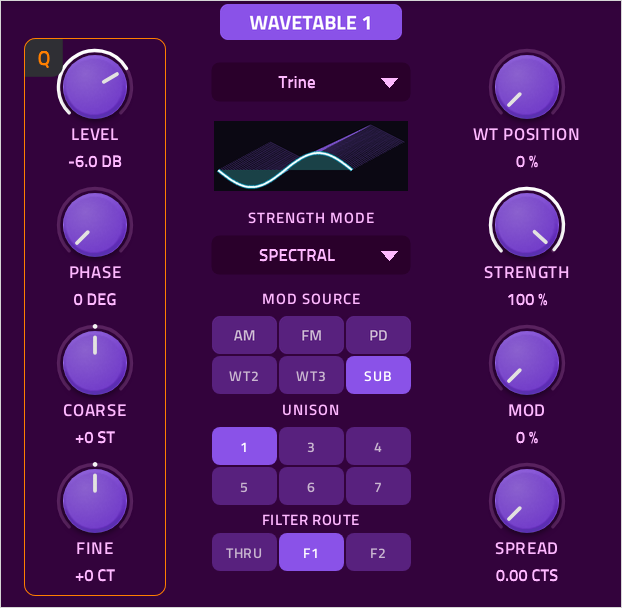
The OSC 1+2 page holds two wavetable oscillators, Wavetable 1 and Wavetable 2. Wavetable 3 is identical and sits on the next page.
Tap a bank's title to turn that oscillator on or off.
Each bank has a bank of four knobs on the left, a middle lane of menus and buttons, and a bank of four knobs on the right.
Left Knobs
| Control | Range | Description |
|---|---|---|
| Level: | -∞ to +12 dB | The oscillator's volume. |
| Phase: | 0° to 360° | Where each note starts in the wave's cycle. |
| Coarse: | -24 to +24 semitones | Tunes the oscillator in semitones. |
| Fine: | -100 to +100 cents | Tunes the oscillator in cents. |
Right Knobs
| Control | Range | Description |
|---|---|---|
| WT Position: | 0% to 100% | Which frame of the wavetable plays, moving smoothly between frames. |
| Strength: | Depends on Strength Mode | How strongly the Strength Mode changes the wave. |
| Mod: | 0% to 100% | The depth of AM, FM or PD. |
| Spread: | 0.00 to 100.00 cents | Detunes the outer Unison voices. At full, 100 cents is one semitone in either direction. |
Middle Lane
Wavetable Menu
The first level lists the groups which expand to list available wavetables. The first level also has Prev and Next buttons to quickly cycle between wavetables. To close the menu, select a wavetable or tap outside of the selection area.
| List | Wavetables |
|---|---|
| Blends | Trine, Res Sine Square, Sine Block, Sahara, Block Saw, Sawing Squares, Noisy Spade, Way-vee, Nick's Sine, Drivin |
| Simple | Shapes, Animated, Flowers, Nevada, Renegade, Tinman, Wob Bass, Not Noise, Sine Noise, Sinenis |
| Digital | Block Filter, Hockey Mask, Dust, New JumpUp, Inorganic, Mr. Sad, Robot, Howard, Ducky, Electrocution |
| Physical | Bass G1, Bass G2, Glass, Piano, Bell, Nylon, Guitar, Sax, Trumpet, Shakuhachi |
| Speech | Alex, Bwob, Electrified, Machina, CRT, Buddhist, Mudboi, Preston, AhYaYuh, Yeeyee |
| Neuro | Clinger, Sama, Decibel, Unknown, Ripper, Sunshine, Asheville, Transformer, Nasty, Justice |
| Movers | Chugged, Digeridoo, Fatal, Mountains, Angry Wobble, Quickie, Nineties, Teddy Bear, Runner, Shaver |
| User 1, 2, 3 | Add your own wavetables using the Wavetable Manager. |
Wavetable Display
A 3D stack of the table's waves. The lit wave reflects the current wavetable position.
Strength Mode Menu
Chooses how Strength modifies the wave. Picking a mode moves the strength knob to the position which does not alter the original sound of the wave.
| Mode | Description | Range |
|---|---|---|
| Distort | Bends the phase. | 0% to 100% |
| Flex + | Squeezes each cycle toward its middle. | 0% to 100% |
| Flex - | Pushes each cycle out toward its ends. | 0% to 100% |
| Fold | Drives the wave up to +18 dB and folds its peaks back in. | 0% to 100% |
| Formant | Moves the harmonics up or down without changing the pitch. | -12 to +12 st |
| PWM | Sets the duty cycle. The wave's first half fills that share of the cycle, and the second half the rest. | 10% to 90% |
| Spectral | Thins the harmonics. | 0% to 100% |
| Sync | The wave restarts every cycle while running up to 8 times faster. | 0% to 100% |
Modulation: AM, FM, PD
Allows another oscillator to modulate this oscillator at audio Rate. The source modulation is processed post Wavetable Position and Tuning, and pre Strength.Only one type can be used at a time. The Mod knob sets the depth.
- AM (Amplitude Modulation): The level rises and falls with the source. Full depth takes it to silence at each trough.
- FM (Frequency Modulation): Through zero, so at strong settings the wave can run backwards.
- PD (Phase Distortion): The reading place in the wave is pushed and pulled by up to 2 cycles.
Modulation Source
Picks which source drives AM, FM or PD.
| Bank | Source buttons |
|---|---|
| Wavetable 1 | Wavetable 2, Wavetable 3, Sub |
| Wavetable 2 | Wavetable 1, Wavetable 3, Sub |
| Wavetable 3 | Wavetable 1, Wavetable 2, Sub |
Unison
Unison stacks several slightly detuned copies of the oscillator on every note for a thicker sound. Choose 1, 3, 4, 5, 6 or 7 voices per note. The voices spread evenly around each note.
Unison costs processing power, so a limit is imposed to how many notes can play at once. The largest Unison setting of the oscillators is used to determine this limit.
| Unison Voice Count | 1 | 3 | 4 | 5 | 6 | 7 |
|---|---|---|---|---|---|---|
| Maximum Polyphony | 16 | 8 | 6 | 5 | 4 | 4 |
Sub and Noise Oscillators
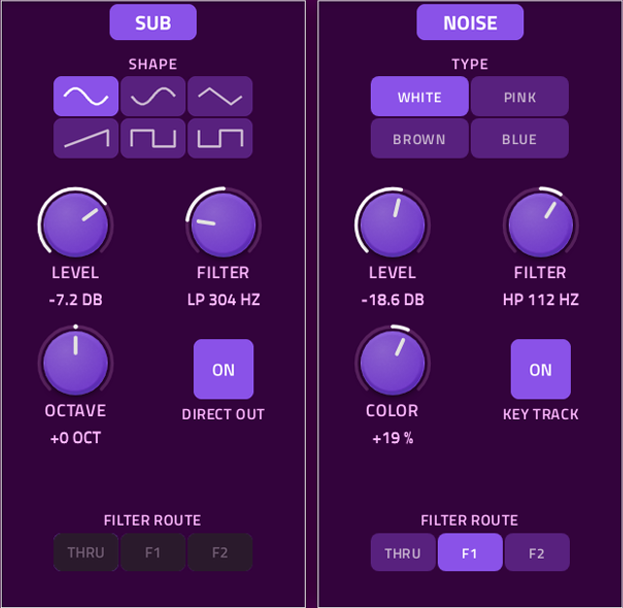
SUB Off at Init
A sub oscillator that plays the note, moved by octave. Tap the title to turn it on or off.
| Control | Description | Range |
|---|---|---|
| Shapes | Buttons used to select one of 6 waveforms. | Sine, Inverted Sine, Triangle, Ramp, Square, Inverted Square |
| Level | Adjusts the output level. | -∞ to +12 dB |
| Octave | The knob is divided into seven equal parts. | -3 to +3 octaves |
| Filter | Turning left engages Low Pass, and turning right engages High Pass. | Low-pass ← OFF → high-pass |
| Direct Out | Routes the Sub signal to the end of the chain. | On or Off |
| Filter Route | Selects the filter to route the Sub signal through. | Thru, Filter 1, Filter 2 |
NOISE Off at Init
A noise generator. Tap the title to turn it on or off.
| Control | Description | Range |
|---|---|---|
| Type | Buttons used to select one of 4 waveforms. | White, Pink, Brown, Blue |
| Level | Adjusts the output level. | -∞ to +12 dB |
| Color | Turn left for a darker sound or right for a brighter sound. | -100% to +100% |
| Filter | Turning left engages Low Pass, and turning right engages High Pass. | Low-pass ← OFF → high-pass |
| Key Track | When on, the pitch of the noise follows the played notes. | On or Off |
| Filter Route | Selects the filter to route the Sub signal through. | Thru, Filter 1, Filter 2 |
Filter Page
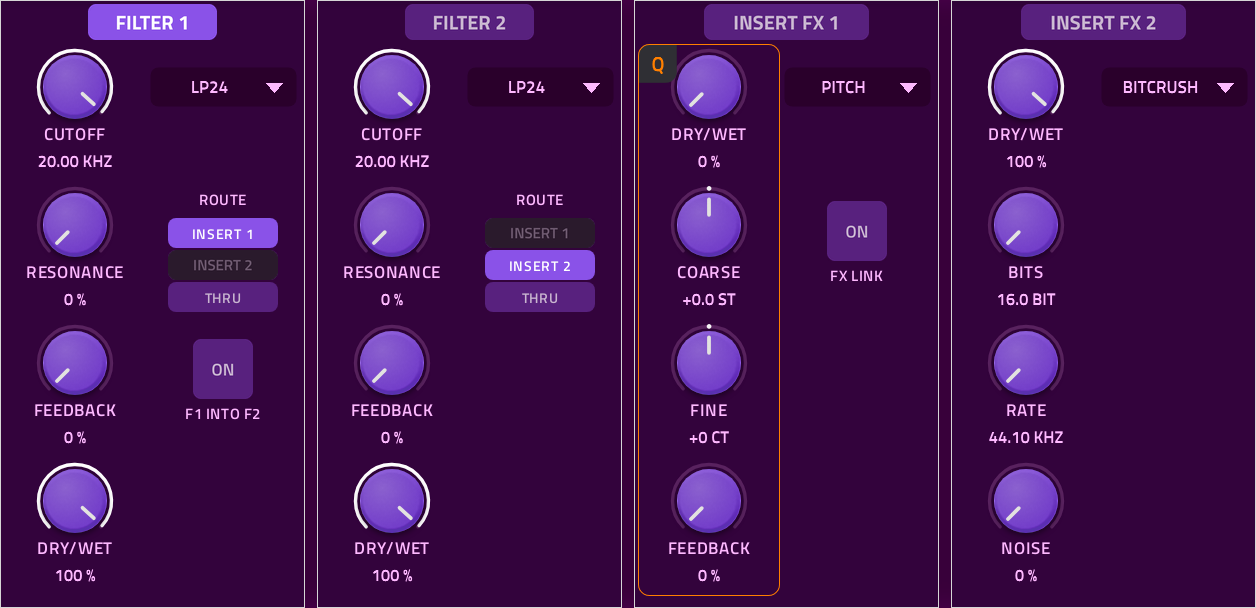
Four banks: Filter 1, Filter 2, Insert FX 1 and Insert FX 2. Tap a title to turn it on or off. Everything on this page works per note.
Filter 1 and Filter 2
A filter removes part of the frequency range. A Low Pass (LP) lets lows through while cutting highs. A High Pass (HP) does the opposite. A Band Pass (BP) keeps a band around the cutoff. Resonance boosts the frequencies at the cutoff point for a sharper tone.
| Control | Range | Description |
|---|---|---|
| Type | LP12/24, HP12/24, BP12/24 | 12 or 24 dB per octave. |
| Cutoff | 20 Hz to 20 kHz | The frequency at which the filter starts to affect the signal. |
| Resonance | 0% to 100% | Boosts the frequencies at the cutoff point for a sharper tone. |
| Feedback | 0% to 100% | Feeds the filter's output, soft-clipped, back into its input for grit and drive. |
| Dry/Wet | 0% to 100% | Controls the mix of the original and filtered signals. |
| Route | Insert 1, Insert 2, Thru, Filter 2 | Where the filter's output goes next. See Signal Flow. |
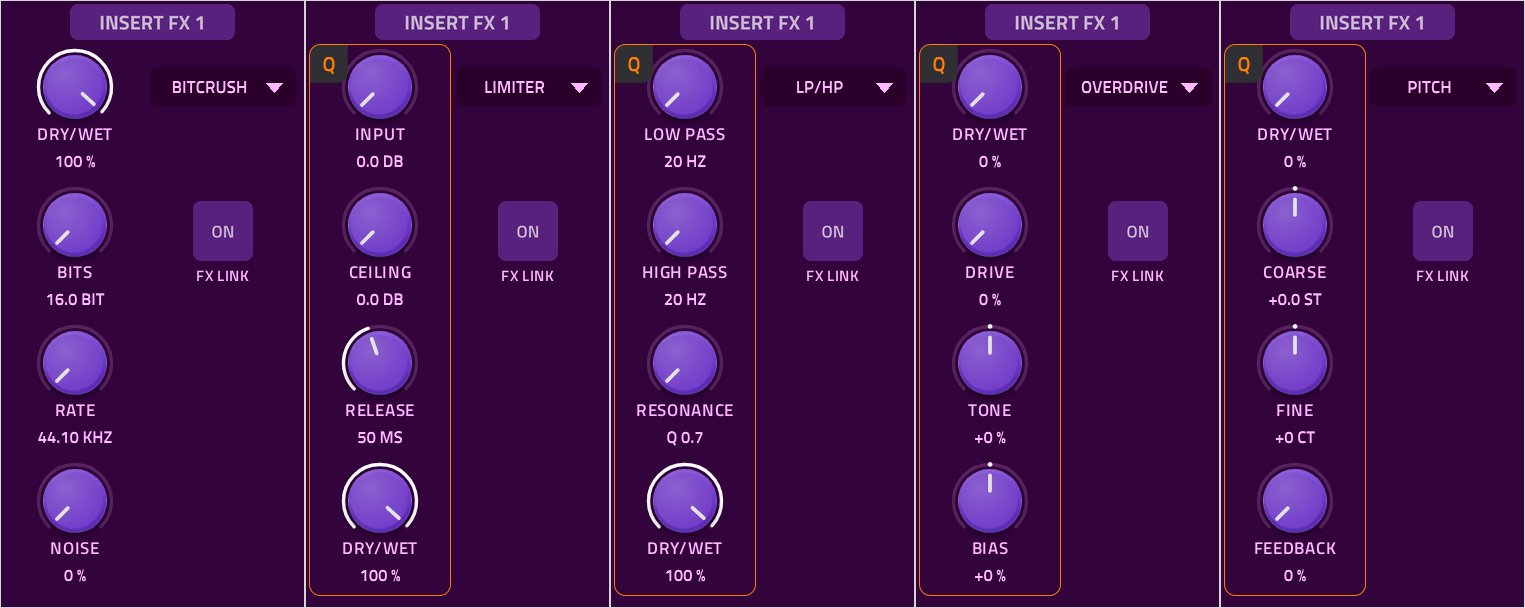
Insert FX 1 and Insert FX 2
Each insert has a TYPE menu and four knobs whose meaning follows the type. Picking a type sets knobs 2-4 to where the effect leaves the sound as it is.
| TYPE | Knob 1 | Knob 2 | Knob 3 | Knob 4 |
|---|---|---|---|---|
| Bitcrush | Dry/Wet | Bits | Rate | Noise |
| Limiter | input | Ceiling | Release | Dry/Wet |
| LP/HP | Low Pass | High Pass | Resonance | Dry/Wet |
| Overdrive | Dry/Wet | Drive | Tone | Bias |
| Pitch | Dry/Wet | Coarse | Fine | Feedback |
- Bitcrush Noise: Dither. At 0 there is none, so quiet tails cut off; low settings add a soft hiss; high settings a thick, fuzzy floor.
- Overdrive Bias: Off center to add even harmonics.
- FX Link: Routes Insert FX 1's output to Insert FX 2. See Signal Flow.
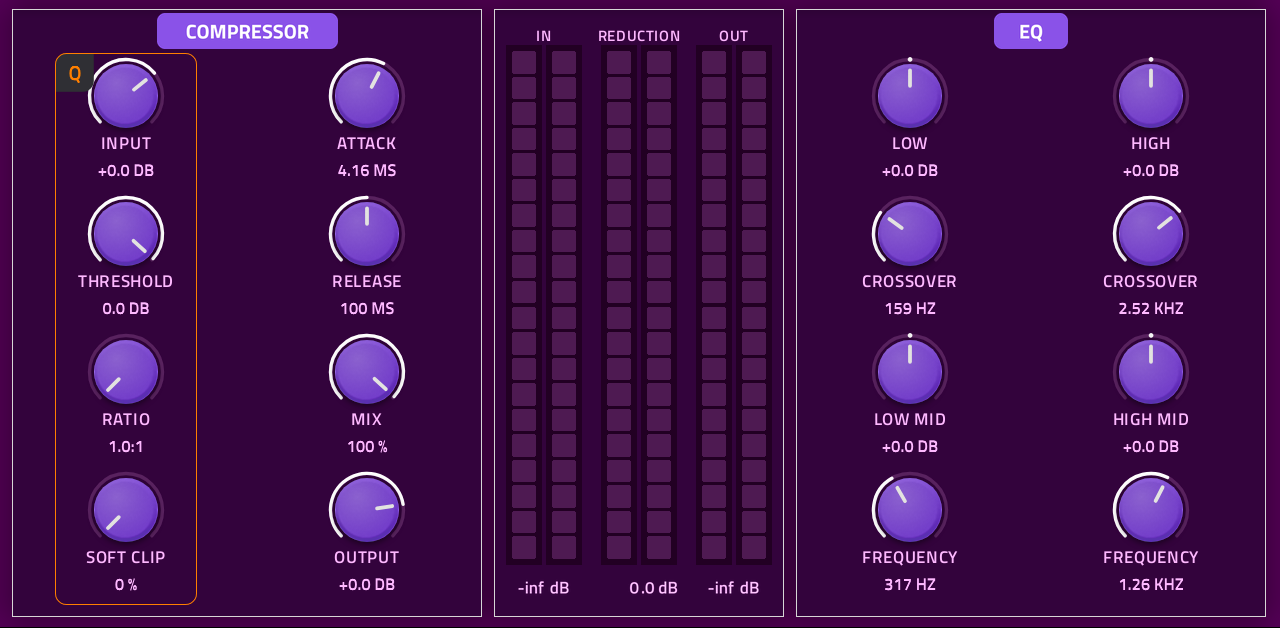
Control
Control contains a compressor and equalizer that process the whole mix after the voices are summed.
Compressor
A compressor turns down the parts of the sound above the Threshold, by the set Ratio, to even out the level.
| Control | Range |
|---|---|
| Input | -∞ to +24 dB |
| Threshold | -60 to 0 dB |
| Ratio | 1:1 to 20:1 (6 dB soft knee) |
| Soft Clip | 0% to 100% |
| Attack | 0.1 to 50 ms |
| Release | 5 ms to 2 s |
| Mix | 0% to 100% |
| Ooutput | -∞ to +12 dB |
- Soft Clip: Rounds off peaks toward full scale, from a knee at 0 dB down to -12 dB.
- Mix: Blends the compressed sound against the dry sound.
Equalizer
Each of the four bands can go from full kill to +15DB.
| Band | Type | Action |
|---|---|---|
| Low | Shelf | Removes or boosts everything below the crossover. |
| Low Mid | Bell | A notch at that frequency |
| High Mid | Bell | A notch at that frequency |
| High | Shelf | Removes or boosts everything above the crossover |
The EQ is routed before the compressor, so boosting a band drives the compressor harder.
Meters
- In: Routed after the input knob, before the Equalizer.
- Reduction: The compressor's gain reduction.
- Oout: Routed after the Output knob.
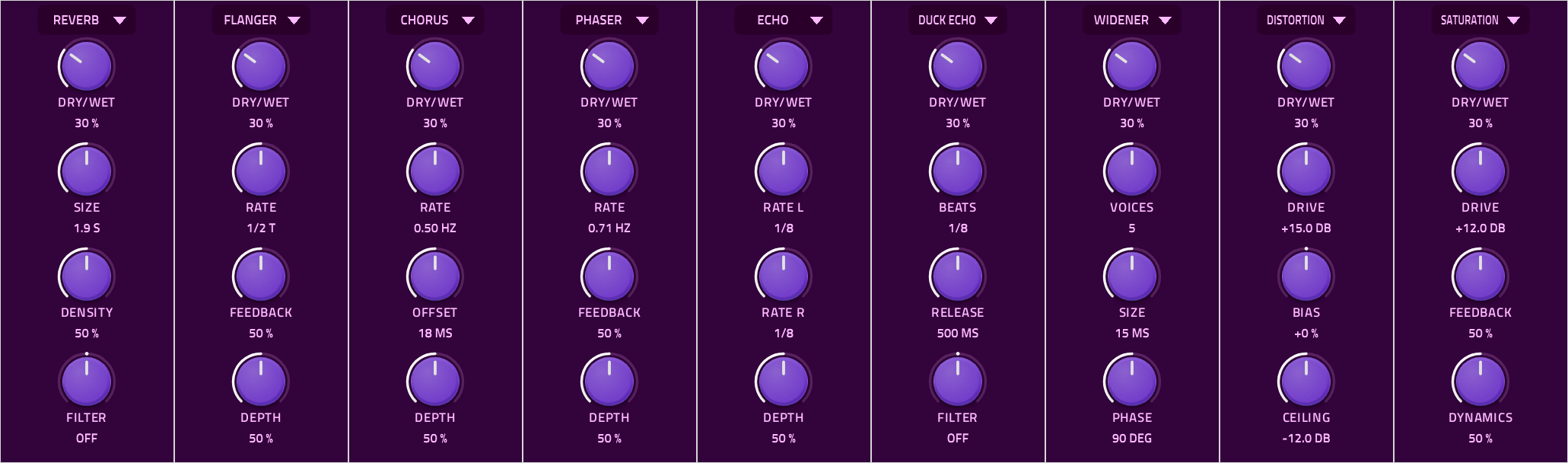
FX
The FX page contains FX 1, FX 2, Width, and Maximizer.
FX 1 and FX 2
The bank's title is its FX Menu.
All FX are inspired by Club DJ Mixer FX.
The available effects are Reverb, Flanger, Chorus, Phaser, Echo, Duck Echo, Widener, Distortion, and Saturation.
- Knob 1 is always Dry/Wet.
- On Reverb, Echo and Duck Echo, Dry/Wet the dry signal stays full up to 50% and the wet is full startingfrom 50%.
- On Flanger, Chorus and Phaser, 100% is the deepest effect.
- Tempo based knobs follow the project tempo.
| TYPE | Knob 2 | Knob 3 | Knob 4 |
|---|---|---|---|
| Reverb | Size (Decay and Room Size) | Density | Low Pass/High Pass Filter |
| Flanger | Rate | Feedback | Depth |
| Chorus | Rate | Offset (voice delay amount) | Depth |
| Phaser | Rate | Feedback | Depth |
| Echo | Rate Left | Rate Right | Depth |
| Duck Echo | Beats | Release | Low Pass/High Pass Filter |
| Widener | Voice Count | Size | Phase |
| Distortion | Drive | Bias | Ceiling |
| Saturation | Drive | Feedback | Dynamics |
- Duck Echo: The echo stays silent while the sound plays and comes up when it stops.
- Widener: Short delays on the side signal only, so the sound in mono matches the dry signal.
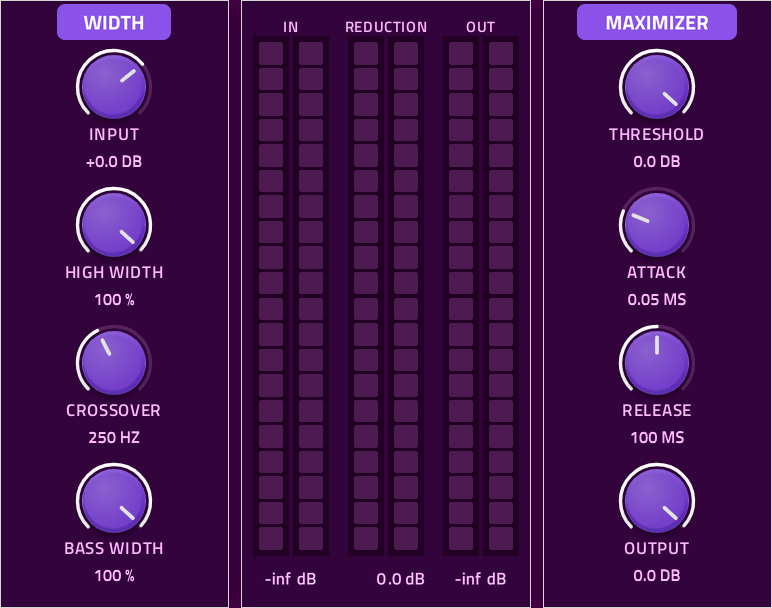
Width
| Control | Range |
|---|---|
| Input | -∞ to +24 dB |
| High Width | 0% to 100% |
| Crossover | 0 to 1500 Hz |
| Bass Width | 0% to 100% |
At both widths 100% the sound passes untouched.
Meters
- In: The maximizer's input.
- Reduction: The maximizer's gain reduction.
- Out: The plugin's output.
Maximizer
A loudness maximizer with a 0 dBFS ceiling.
| Control | Range |
|---|---|
| Threshold | -30 to 0 dB |
| Attack | 0.01 to 5 ms |
| Release | 5 ms to 2 s |
| Output | -∞ to 0 dB |
The Sub's Direct Out is routed to the Output knob.
LFOs
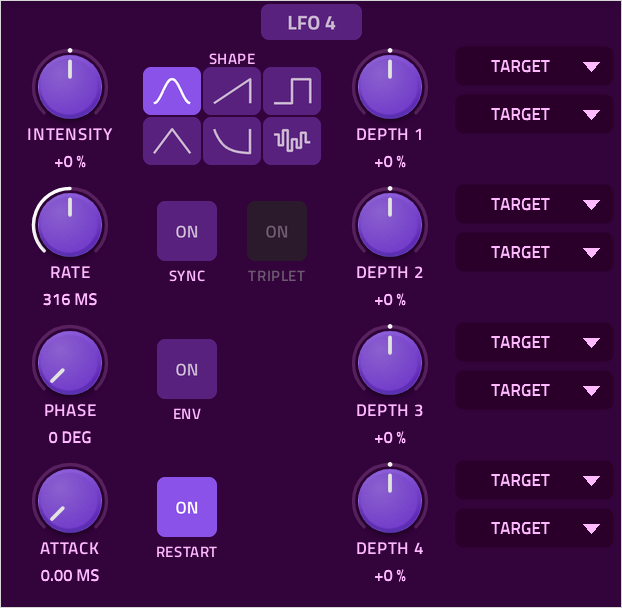
An LFO is a repeating movement that moves other controls for you. CTRL Giant has four identical LFOs, two per page. Tap a title to turn an LFO on or off.
Each LFO has a bank of four knobs, buttons in the middle, and a bank of four depth knobs. Each Depth knob has two assignable targets.
Knobs
| Control | Range |
|---|---|
| Intensity | -100% to +100% |
| Rate | 10s to 10ms or 1/32 to 8 BARS |
| Phase | 0° to 360° |
| Attack | 0 to 10s |
| Depth 1-4 | -100% to +100% |
Buttons
- Shape: Sine, Ramp, Square, Triangle, Drop, and Noise.
- Sync: Sets Rate in note values, locked to the tempo.
- Triplet: Triplet note values.
- Envelope: The LFO plays its shape once from each note's start and holds.
- Restart: The LFO restarts at each note.
Target Menus
Each depth knob has two target menus. To view the full list of targets, see Modulation in Depth.
Wavestepper 1 & 2
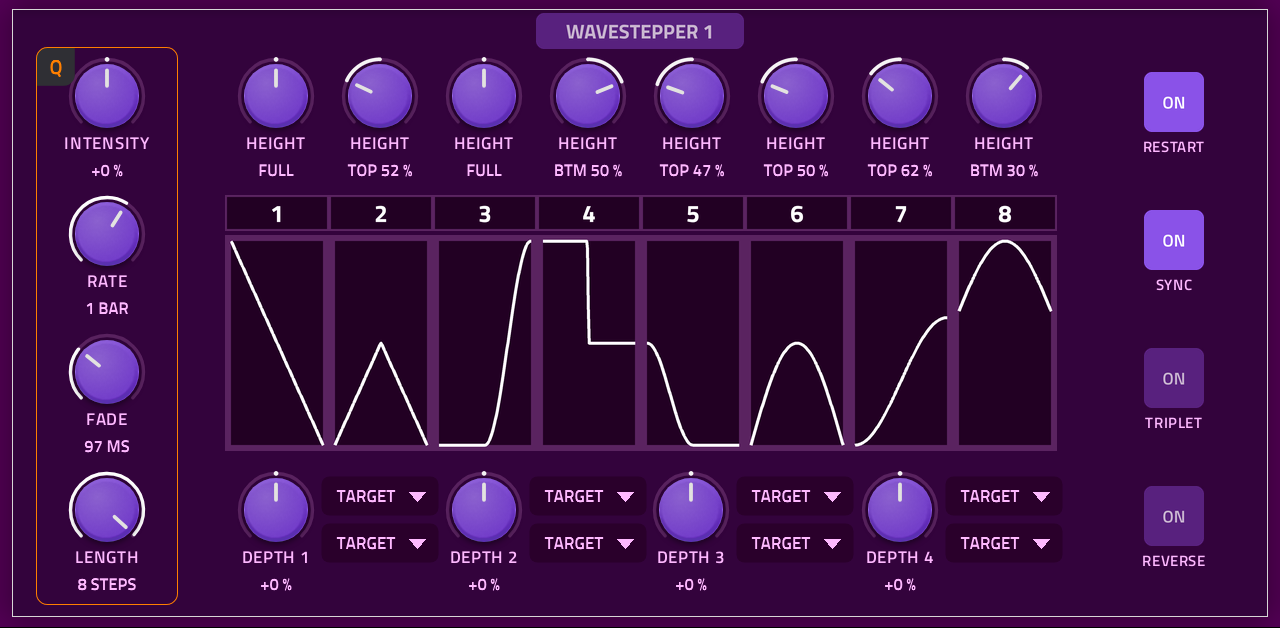
The two Wavesteppers are identical step modulators. They allow you to creat complex LFO shapes by combing different step shapes and heights.
Left Knobs
| Control | Range |
|---|---|
| Intensity | -100% to +100%, center none |
| Rate | 10s to 10ms or 1/32 to 8 Bars |
| Fade | 0 to 1s |
| Length | 1 to 8 Steps |
Fade: Fades the shape transition between each shape.
Buttons
- Restart: The pattern restarts at each note.
- Sync: Rate in beat values, locked to the tempo.
- Triplet: Triplet beat values.
- Reverse: Plays the steps backwards.
The Steps
The 20 shapes: Fall, Late Fall, Early Rise, Rise, Smooth Fall, Fall Rest, Rest Rise, Smooth Rise, Ramp Down, Up Down, Down Up, Ramp Up, Arch, Hump, Dip, Low Dip, High Low, Low, Pulse, Low High.
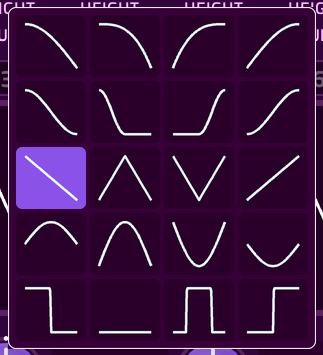
The middle of the page shows the 8 steps side by side.
- Shape: Each step shows its shape. Tap it to open a grid of 20 shapes and pick one. Tap outside the grid to close it.
- Height: At the center, the shape uses the full range. Turn left to lower its top, or right to raise its bottom.
- Step Numbers: Tap a number to turn that step off. An off step holds the level where the previous step ended.
- Playing Step: While a step lasts at least 300ms or 1/8 beat, the playing step's number lights up.
Target Menus
Each depth knob has two target menus. To view the full list of targets, see Modulation in Depth.
Envelopes
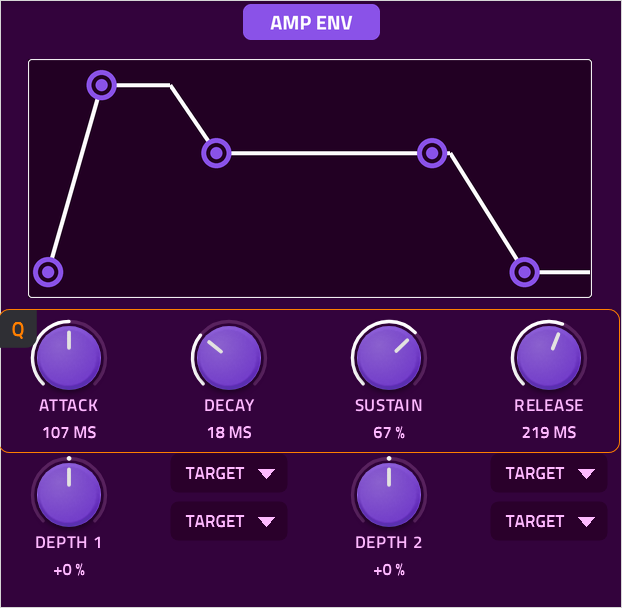
An envelope is a shape that plays over each note's life. Attack is how long it takes to rise. Decay is how long it takes to fall to the Sustain level. Sustain is the level held while the key is played. Release is how long it takes to fade after the key is let go.
CTRL Giant has four envelopes. ENV 1 is always the Amp Envelope. All envelopes can be set to modulation targets.
| Control | Range |
|---|---|
| Attack | 0 ms to 10 s |
| Decay | 0 ms to 10 s |
| Sustain | 0% to 100% |
| Release | 0 ms to 10 s |
| Depth 1, Depth 2 | -100% to +100% |
- Minimum times: However short they are set, a note takes at least 3 ms to start and 20 ms to end, so it never clicks.
- Touch Edit: Drag the Attack, Decay or Release point left or right. Drag the Sustain point up and down.
- Depth 1 and 2: Each depth knob has two target menus. To view the full list of targets, see Modulation in Depth.
- Amp Envelope Power: The Amp Envelope's power setting only controls its modulation targets.
Perform
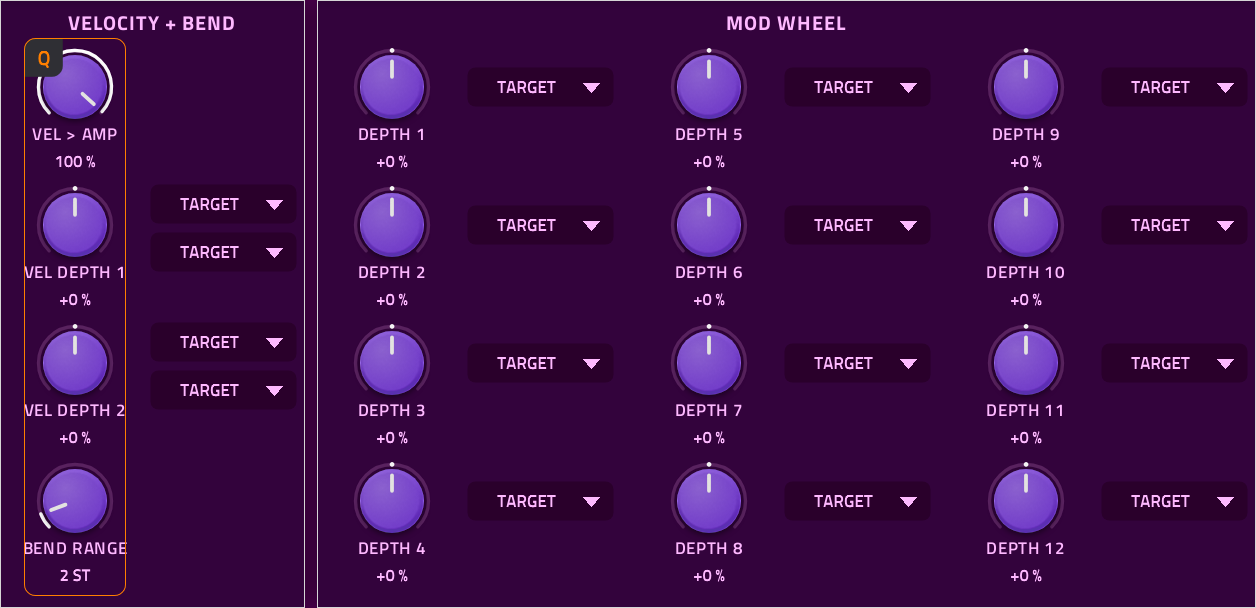
The Perform page allows you to adjust how the Velocity, Pitch Bend, and Mod Wheel of your keyboard affect the sound.
Velocity + Bend
| Control | Range |
|---|---|
| Velocity > Amp | 0% to 100% |
| Velocity Depth 1 and 2 | -100% to +100% |
| Bend Range | 0 to 24 semitones |
Mod Wheel
Depth 1-12, -100% to +100%.
Target Menus
Each depth knob has target menus. To view the full list of targets, see Modulation in Depth.
Utility Page
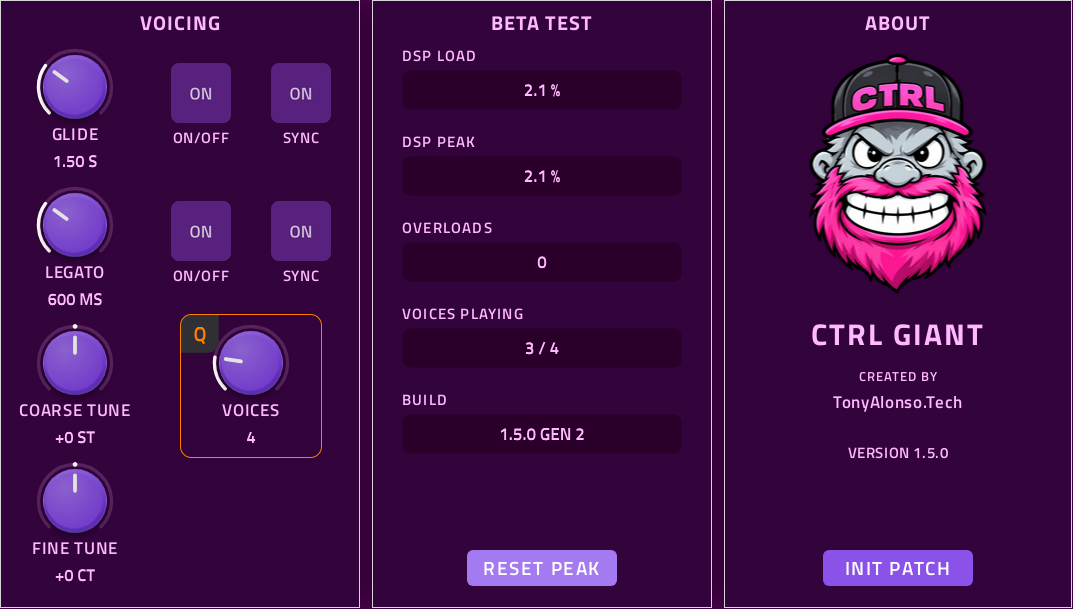
Every CTRL plugin has a Utility page. It provides the details needed for debugging and reporting issues. In synthesizer plugins, it also holds settings which change the plugin's overall behavior.
On CTRL Giant, the Utility page holds the voicing settings, the beta test readouts and plugin information. In and Out meters sit at the far left. In shows the voice summing level. Out shows the plugin's output.
Voicing
| Control | Range |
|---|---|
| Glide | 0s to 5s or 1/32 to 8 Bars |
| Legato | 0s to 3s |
| Coarse Tune | -24 to +24 Semitones |
| Fine Tune | -100 to +100 Cents |
| Voices | 1 to 16 |
- Glide: Each new note slides from the last one's pitch. It has its own On/Off and Sync buttons.
- Legato: With Legato on, a note played while another is held slides the held voice to it with no new Attack, and back when it is let go. The first half of the knob adjusts 0-1 s. It has its own On/Off and Sync buttons.
- Coarse Tune and Fine Tune: Tunes the whole plugin.
- Voices: The most notes that can play at once. Unison can lower the limit further.
BETA TEST
- DSP Load: CTRL Giant's own processing time, as a share of each audio block.
- DSP Peak: The highest DSP Load since Reset Peak was pressed.
- Overloads: Audio blocks that took longer than a whole block, which is an audible dropout.
- Voices Playing: Notes sounding / the Voices setting.
- Build: The version, and GEN 1 or GEN 2 for the build installed.
- Reset Peak: Sets DSP Peak and Overloads back to 0.
About
Shows the CTRL Giant logo, who it was created by (TonyAlonso.Tech), and the plugin's version number.
The Init Patch button puts every control back to its Init setting.
Modulation in Depth
Modulation allows one source to move a target control automatically. In CTRL Giant you connect them with depth knobs and target menus.
| Source | Depth knobs | Targets per depth knob |
|---|---|---|
| LFO 1-4 | 4 each | 2 |
| Wavestepper 1-2 | 4 each | 2 |
| Envelopes 1-4 | 2 each | 2 |
| Velocity | 2 | 2 |
| Mod wheel | 12 | 1 |
How Depth Works
- Center: Every depth knob has no effect at its center. Rotating clockwise moves the target up. Moving counter-clockwise moves the target down.
- Full depth moves a target across its knob's whole range.
- Unassigned: A target menu reads TARGET until a target is picked.
- Sources add up: Several sources can move the same target; their movements are summed together.
- Per note: Modulation is per note. Each voice has its own modulation with the exception of the FX 1 and FX 2 knobs, which act on the summed sound, and follow the newest note.
The Complete Target List
Target menus have two levels. The first shows Off and the group names. The second shows the targets.
| Group | Targets |
|---|---|
| Off | No target |
| Oscillator 1, 2, 3 | Wavetable Position, Strength, Coarse, Fine, Level, Phase, Mod |
| Sub and Noise | Sub Level, Sub Octave, Sub Filter, Noise Color, Noise Level, Noise Filter |
| Insert FX | Insert FX 1 Knob 1-4, Insert FX 2 Knob 1-4 |
| Filter | Filter 1 Cutoff, Filter 1 Resonance, Filter 1 Feedback, Filter 1 Dry/Wet, Filter 2 Cutoff, Filter 2 Resonance, Filter 2 Feedback, Filter 2 Dry/Wet |
| LFO | Intensity, Rate, Attack, Phase |
| FX | FX 1 Knob 1-4, FX 2 Knob 1-4 |
Presets
MPC's preset menu has two presets for CTRL Giant:
Init
Every control at its default. Plays Wavetable 1 on Trine through Filter 1. This is the best starting point for a new sound.
CPU Test
Every stage at its most demanding, used to measure processing load. See Beta Testing.
A sound you make is saved with your MPC project, or as an MPC preset.
CTRL Giant Wavetable Manager
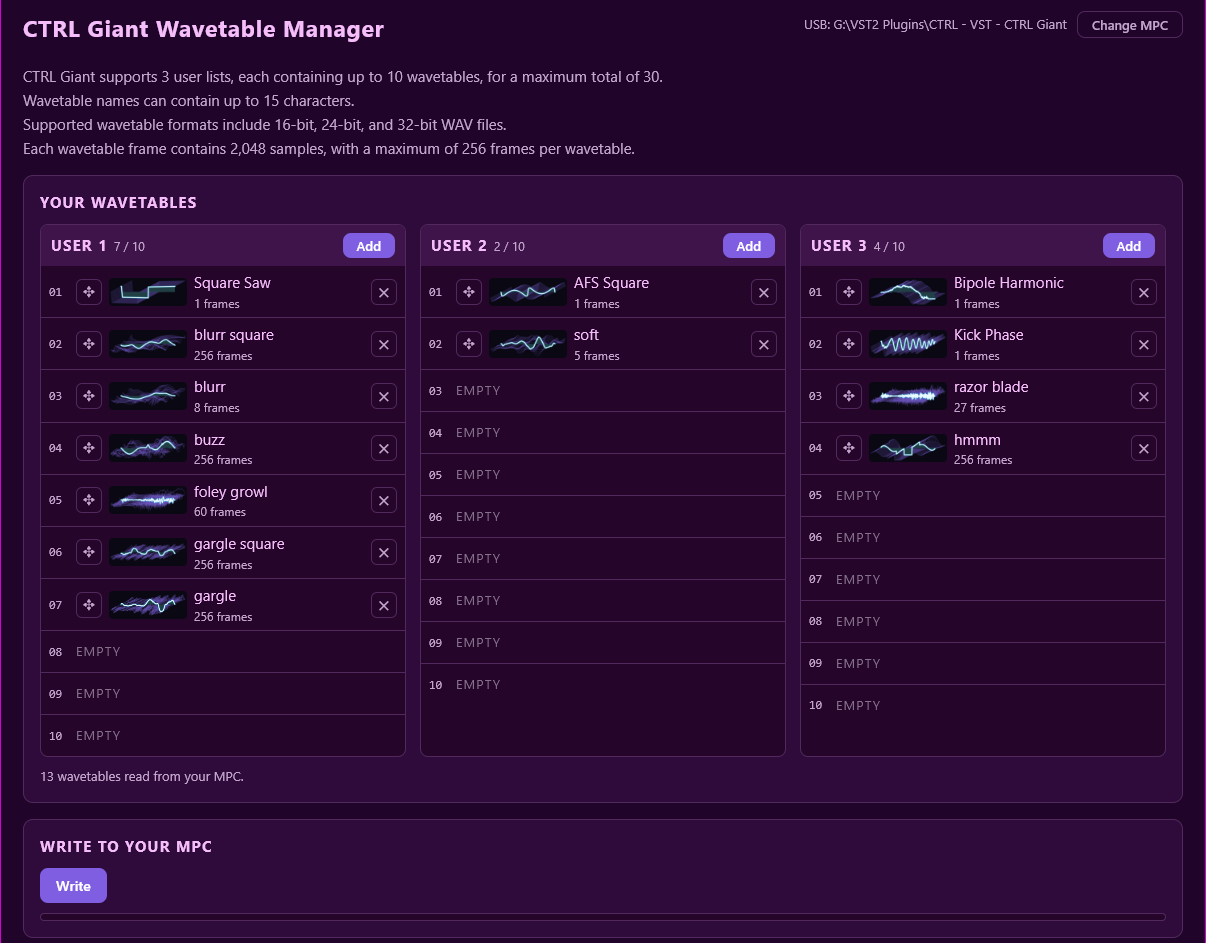
A desktop app that puts your own wavetables into CTRL Giant's User 1, User 2 and User 3 lists, with their 3D pictures and names.
The Wavetable Manager is a separate download for Windows and macOS, available with the plugin downloads at the top of this manual. It runs on your computer and does not go on the MPC.
| Limit | Value |
|---|---|
| Lists | 3 lists of up to 10 wavetables (30 in total) |
| Names | Up to 15 characters long |
| WAV files | 16-bit, 24-bit or 32-bit. Stereo files are mixed to mono |
| Frames | 2048 samples per frame, up to 256 frames per table. A partial frame at the end is noted and left out. |
Running the App
Windows
Extract CTRL-WavetableManager.zip and double click CTRLGiant Wavetable Manager.exe. Windows may warn about an unknown app the first time you run it. Choose More info → Run anyway.
Nothing is installed. The app keeps its own copy of your tables on the computer, in %APPDATA%\ctrl-giant-wavetable-manager.
Mac
Requires macOS 10.15 or later, on Apple Silicon or Intel.
Open CTRL-WavetableManager.zip, then drag CTRL Giant Wavetable Manager.app into your Applications folder and double click it.
The first time, macOS will block the app because it isn't from the App Store or an identified developer. Click Done, then open System Settings → Privacy & Security, scroll down and click Open Anyway. You only need to do this once.
macOS may ask to let the app find devices on your local network (needed for Network mode) and to access removable volumes (needed for USB mode). Allow both.
The app keeps its own copy of your tables in ~/Library/Application Support/ctrl-giant-wavetable-manager.
1. Connect
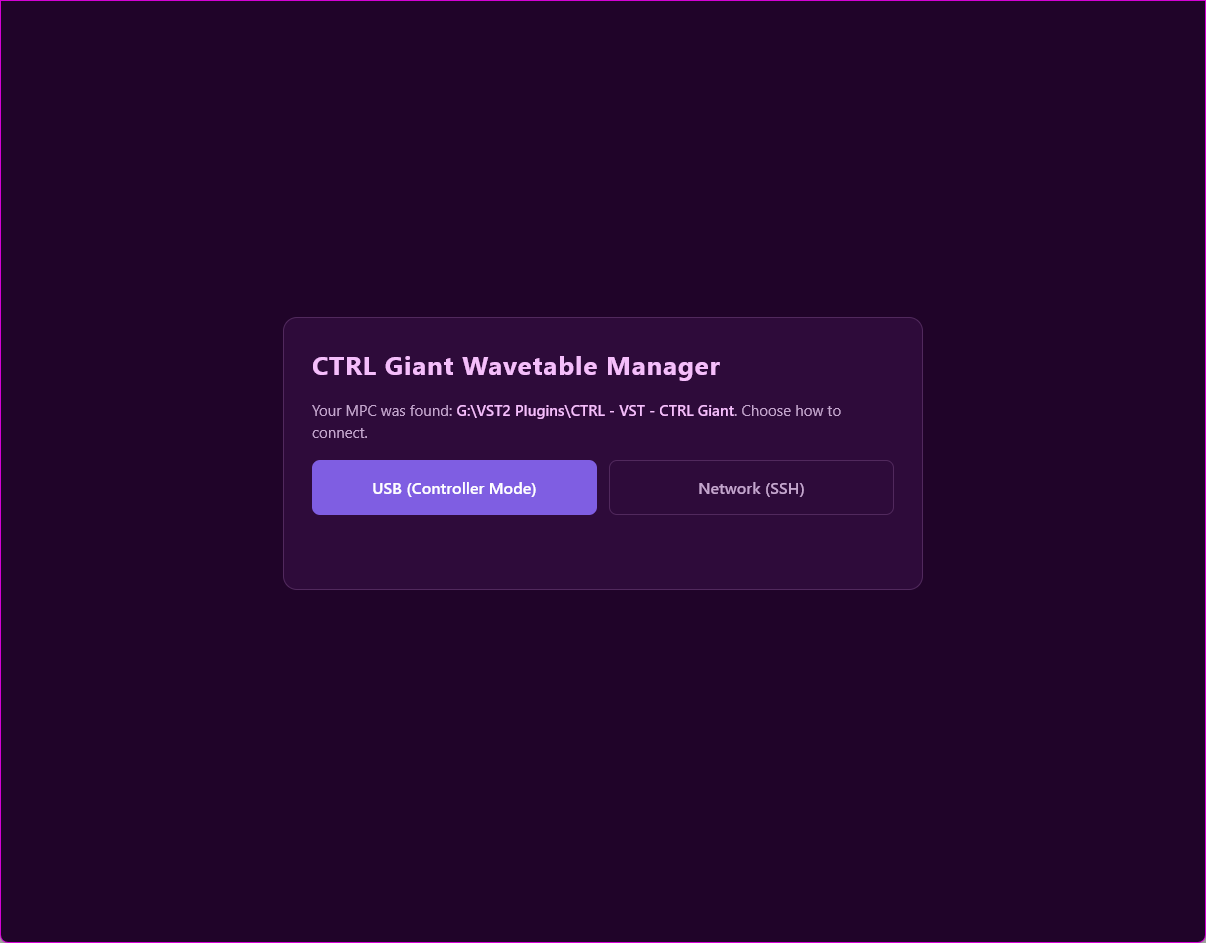
On the first screen, choose how to connect:
- USB (Controller Mode): Connect the MPC to the computer by USB and put it in Controller Mode (see Installation). The app finds CTRL Giant on the MPC's drives. If it doesn't, click Browse and choose the CTRL - VST - CTRL Giant folder inside VST2 Plugins. Look again searches again.
- Network (SSH): Only to be used on a secure private network where you control all of the network equipment. Make sure CTRL Giant isn't open on the MPC, because the plugin must be reloaded before changes apply. Enter the MPC's IP address and SSH password. The app finds CTRL Giant itself.
Then click Connect. Change MPC takes you back to this screen.
2. Edit Your Wavetables
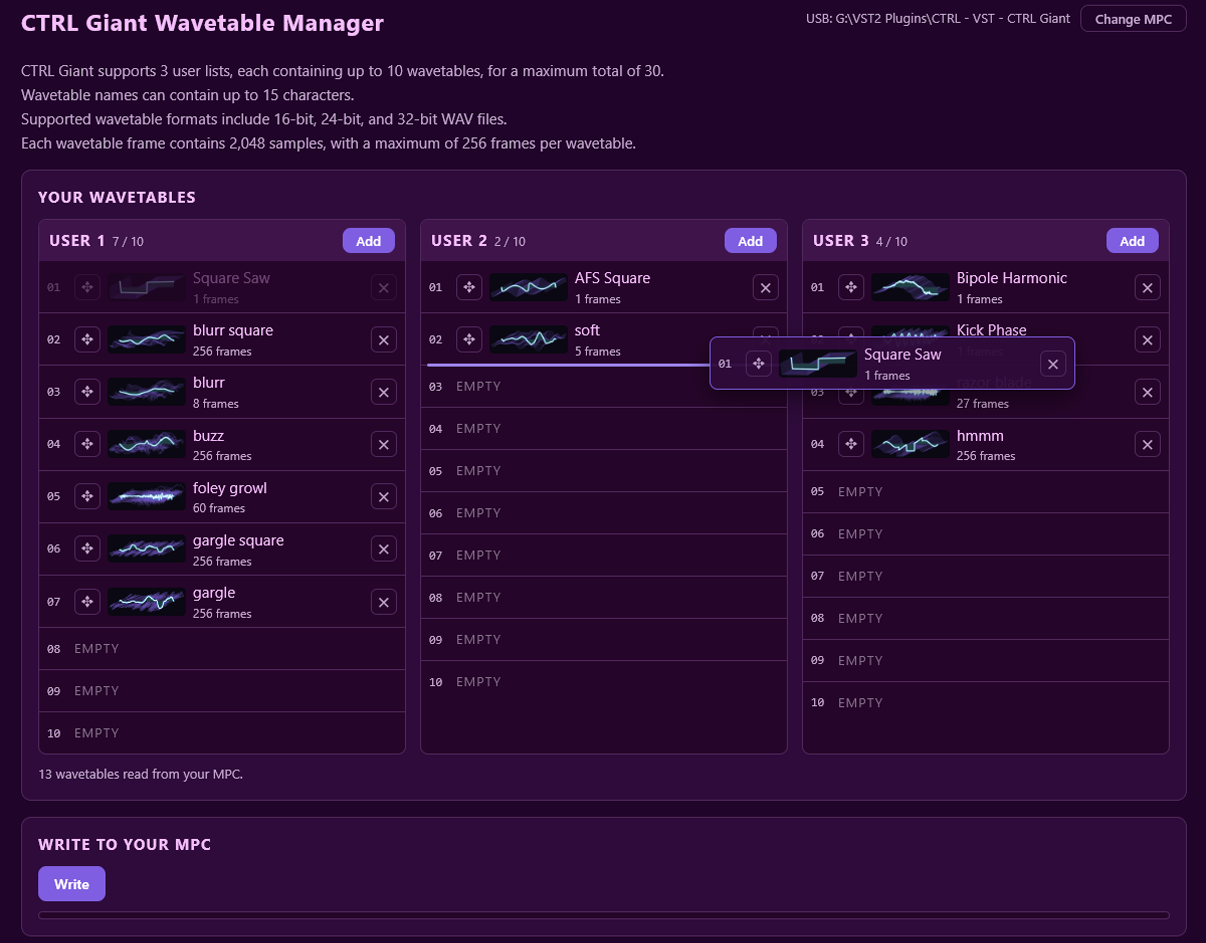
The lists show what is on your MPC.
- Add: Adds WAV files to a list.
- Rename: Click a name to rename it.
- Move: Drag a wavetable by its ✥ handle anywhere within the three lists.
- Remove: Click ✕. The wavetables below move up.
3. Write to Your MPC
- Click Write under "Write to your MPC".
- Switch the MPC back to standalone mode by tapping Standalone.
- Open CTRL Giant. The USER lists are updated.
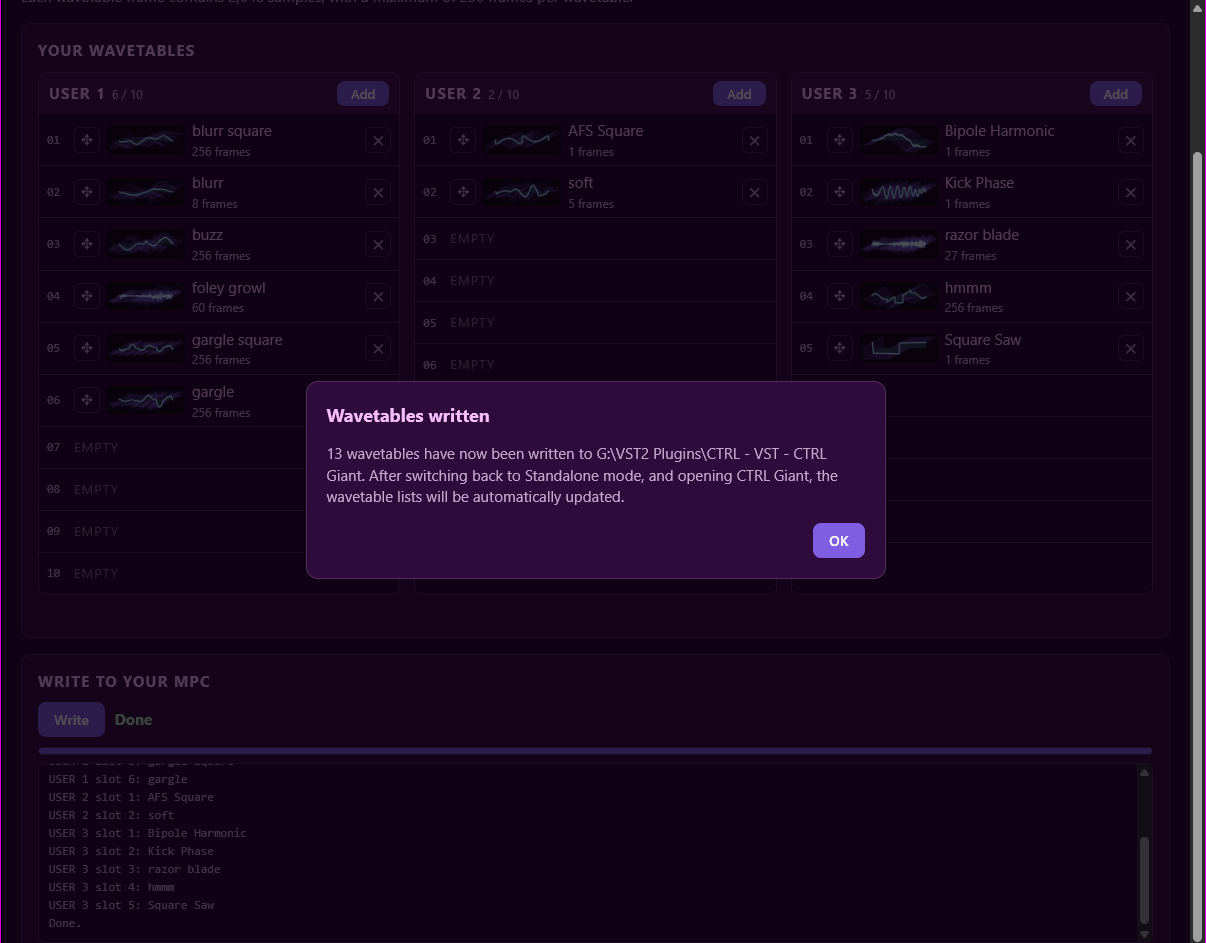
The app writes your tables, their names, their pictures and a stamp to VST2 Plugins/CTRL Wavetables. It also updates the pictures inside CTRL Giant's own folder so they show at once.
In CTRL Giant, a filled slot appears under USER 1-3 in the WAVETABLE menu with its own name and picture; an empty slot reads EMPTY.
Beta Testing
Thank you for testing CTRL Giant. Version 1.5.1 is a public beta: everything works, and your reports help finish it. Download the Gen 2 zip for second-generation devices (MPC Live III, One G2, Key G2, XL, and Akai Force G2), or the Gen 1 zip for first-generation MPCs (MPC Live, Live II, One, X, Key 61, Key 37) and the Akai Force, and install it as described in the Installation steps.
Run the CPU Test
- Load the CPU TEST preset.
- Hold 16 notes.
- Open the UTILITY page and press RESET PEAK.
- After 20 seconds, read DSP PEAK.
Include the DSP PEAK reading in your report.
When you send in results, please include the following:
- Utility readings: DSP LOAD, DSP PEAK, OVERLOADS, VOICES PLAYING and BUILD from the UTILITY page's BETA TEST bank.
- Device: Your MPC model. The plugin can't see it, so please tell us.
- Firmware: The MPC OS version (MPC OS 3.10.1 or later). The plugin can't see this either.
- What you did: What you were doing when the problem happened.
- Anything unexpected: Clicks, dropouts, controls that do not respond, or high CPU load. Where you can, include a short video showing the issue as it happens, with the sound audible.
Send your results using the form below. Share videos as an unlisted YouTube link.
Want your presets featured in the official release, and your artist name credited within the plugin? Submit your presets! Preset submissions must be made using the stock wavetables.
Tips & Troubleshooting
Tips
- Centers are neutral: Every knob with a center does nothing at its center. Init leaves the Control and FX pages sounding exactly as the voices do, so you can turn them on without changing your sound.
- Change things while playing: Changing routes, types or on/off states while notes play never clicks, because all of them crossfade.
- Audition wavetables quickly: Use Prev and Next in the Wavetable menu.
- Automation names: The MPC's Q-Link and automation lists show each control's full name, such as "Osc1 Level" or "Filter 1 Cutoff".
- Save CPU: High unison and note counts are the most demanding. Keep Voices and Unison to what a part needs, to leave room for other plugins.
Troubleshooting
- CTRL Giant isn't listed: Check that MPC OS is 3.10.1 or later, that Enable Enhancements and External Plugin Support are on, and that the CTRL - VST - CTRL Giant folder itself (not just its contents) is inside VST2 Plugins at the top of the drive. If you installed to the internal drive, restart the MPC.
- Wrong build: Utility → Build shows GEN 1 or GEN 2. Make sure it matches your device.
- No sound from a wavetable: An Empty User slot is silent. Pick another table or fill the slot with the Wavetable Manager.
- Notes cut short or fewer notes than expected: Check Voices on Utility and the Unison setting of each oscillator that is on. Unison lowers the note limit.
- A control is greyed: It can't be used in the current setting. For example, a Filter Route is greyed while Filter 1 Into Filter 2, FX Link or Direct Out is on. Triplet is greyed while SYNC is off.
- Dropouts: Watch Overloads on Utility. Lower Voices or Unison, then report your readings (see Beta Testing).
- Your wavetables don't appear: After writing, switch the MPC back to standalone mode and open CTRL Giant again. Over the network, make sure CTRL Giant was closed while writing, as it must be reloaded before changes apply.
Q-Link Quick Reference
Every page's Q-Link layout on one table. Each bank is one Q-Link bank, top to bottom.
| Page | Q-Links 1-4 | Q-Links 5-8 | Q-Links 9-12 | Q-Links 13-16 |
|---|---|---|---|---|
| OSC 1+2 | WT 1: LEVEL, PHASE, COARSE, FINE | WT 1: WT POSITION, STRENGTH, MOD, SPREAD | WT 2: LEVEL, PHASE, COARSE, FINE | WT 2: WT POSITION, STRENGTH, MOD, SPREAD |
| OSC 3+SUB+NOISE | WT 3: LEVEL, PHASE, COARSE, FINE | WT 3: WT POSITION, STRENGTH, MOD, SPREAD | SUB: SHAPE, LEVEL, OCTAVE, FILTER | NOISE: TYPE, LEVEL, COLOR, FILTER |
| FILTER | FILTER 1: CUTOFF, RESONANCE, FEEDBACK, Dry/Wet | FILTER 2: CUTOFF, RESONANCE, FEEDBACK, Dry/Wet | INSERT FX 1: knobs 1-4 | INSERT FX 2: knobs 1-4 |
| CONTROL | INPUT, THRESHOLD, RATIO, SOFT CLIP | Attack, Release, MIX, OUTPUT | LOW, CROSSOVER, LOW MID, FREQUENCY | HIGH, CROSSOVER, HIGH MID, FREQUENCY |
| FX | FX 1: knobs 1-4 | FX 2: knobs 1-4 | WIDTH: INPUT, HIGH WIDTH, CROSSOVER, BASS WIDTH | MAXIMIZER: THRESHOLD, Attack, Release, OUTPUT |
| LFO 1+2 | LFO 1: INTENSITY, Rate, PHASE, Attack | LFO 1: DEPTH 1-4 | LFO 2: INTENSITY, Rate, PHASE, Attack | LFO 2: DEPTH 1-4 |
| LFO 3+4 | LFO 3: INTENSITY, Rate, PHASE, Attack | LFO 3: DEPTH 1-4 | LFO 4: INTENSITY, Rate, PHASE, Attack | LFO 4: DEPTH 1-4 |
| WAVESTEPPER 1 / 2 | INTENSITY, Rate, FADE, LENGTH | HEIGHT 1-4 | HEIGHT 5-8 | DEPTH 1-4 |
| ENV 1+2 | AMP ENV: Attack, Decay, Sustain, Release | AMP ENV: DEPTH 1, DEPTH 2, empty, empty | ENV 2: Attack, Decay, Sustain, Release | ENV 2: DEPTH 1, DEPTH 2, empty, empty |
| ENV 3+4 | ENV 3: Attack, Decay, Sustain, Release | ENV 3: DEPTH 1, DEPTH 2, empty, empty | ENV 4: Attack, Decay, Sustain, Release | ENV 4: DEPTH 1, DEPTH 2, empty, empty |
| PERFORM | VEL > AMP, VEL DEPTH 1, VEL DEPTH 2, BEND RANGE | MOD WHEEL DEPTH 1-4 | MOD WHEEL DEPTH 5-8 | MOD WHEEL DEPTH 9-12 |
| UTILITY | GLIDE, LEGATO, COARSE TUNE, FINE TUNE | empty, empty, VOICES, empty | empty | empty |