PROJECTS

Custom pfSense Router
This project builds a custom pfSense-based router and network security platform featuring VLAN segmentation, IDS/IPS monitoring, secure remote access, DHCP management, and hardened administrative controls.
Custom pfSense Router
This project builds a custom pfSense-based router and network security platform featuring VLAN segmentation, IDS/IPS monitoring, secure remote access, DHCP management, and hardened administrative controls.
Why is this needed?
This project was created to gain hands-on experience building, configuring, securing, and maintaining enterprise-style networking infrastructure within a homelab environment. The goal is to develop practical knowledge in areas such as routing, firewall management, network segmentation, intrusion detection, remote access, and secure network administration.
How does it work?
pfSense is deployed on dedicated routing hardware to provide centralized network management and security services. VLANs are used to logically separate network segments, firewall rules enforce isolation between devices, Snort provides IDS/IPS functionality, and WireGuard enables secure remote connectivity. Additional hardening measures are implemented to reduce the attack surface and improve overall network security.
Project Directory:
Clicking any of the below links will take you to the relevant wiki page covering that topic in depth.
NGINX Hosting Build
This project deploys a dual-environment NGINX architecture across a local Raspberry Pi 4 and Akamai Cloud instance, incorporating automated content synchronization, environment isolation, and hardened configurations.
NGINX Hosting Build
This project deploys a dual-environment NGINX architecture across a local Raspberry Pi 4 and Akamai Cloud instance, incorporating automated content synchronization, environment isolation, and hardened configurations.
Why is this needed?
This project was created to gain hands-on experience building, hosting, maintaining, and securing a web server across both local and cloud environments.
How does it work?
Content is authored and hosted locally on a Raspberry Pi running NGINX, then replicated to a cloud-hosted instance on Akamai Cloud (Linode). Environment separation ensures internal development and production remain isolated from the public-facing deployment.
Project Directory:
Clicking any of the below links will take you to the relevant wiki page covering that topic in depth.
Port Security Cheat Sheet
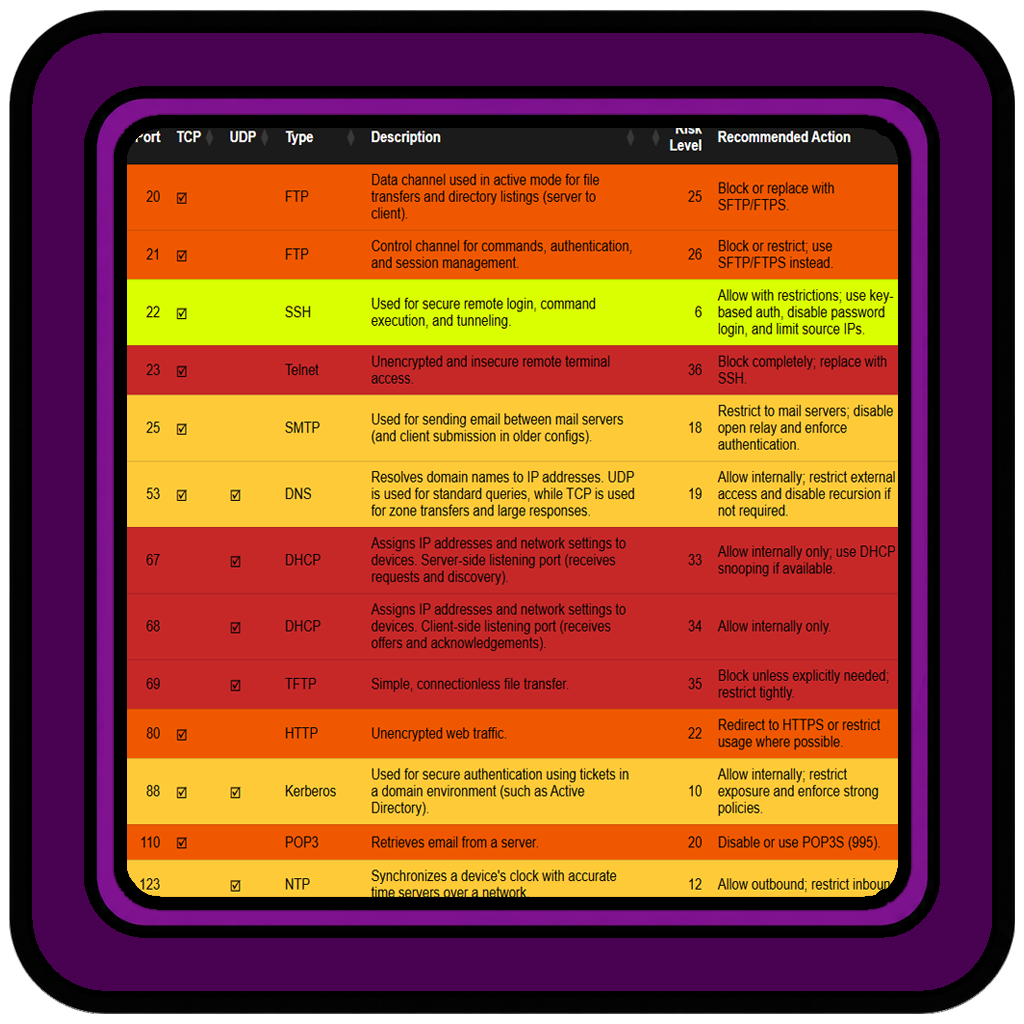
This project provides a searchable, filterable view of common ports, protocols, associated risks, and recommended security actions to improve visibility and decision-making in network security.
Port Security Cheat Sheet
This project provides a searchable, filterable view of common ports, protocols, associated risks, and recommended security actions to improve visibility and decision-making in network security.
Why is this needed?
This project was created to bridge the gap between static documentation and practical usability. Traditional port reference lists are often difficult to navigate during real-world troubleshooting or security reviews. By converting this data into an interactive dashboard, the goal is to provide a fast, intuitive way to identify services, understand their associated risks, and determine appropriate mitigation strategies.
How does it work?
The dashboard is powered by a CSV data source containing port numbers, protocols, service types, risk levels, and recommended actions. This data is loaded dynamically in the browser using JavaScript and parsed into a structured format. The DataTables library is used to render the dataset into an interactive table that supports sorting, searching, and filtering. Custom logic assigns risk categories to each row, which are then visually represented through color-coded styling to highlight severity levels. The application is hosted on an NGINX web server, allowing the dashboard to be accessed locally or across the network, while updates can be made simply by modifying the underlying CSV file and refreshing the page.

Threat Intelligence Dashboard
A lightweight cybersecurity news and threat-feed dashboard that aggregates articles, breach reports, CVE updates, and security research into one searchable interface.
Threat Intelligence Dashboard
A lightweight cybersecurity news and threat-feed dashboard that aggregates articles, breach reports, CVE updates, and security research into one searchable interface.
Why is this needed?
Having a centralized view of cybersecurity news makes it easier to stay informed. This feed combines front-end news outlets with more technical backend sources, allowing you to quickly access both in-depth technical analysis for research and high-level summaries for general interest.
How does it work?
A Python-based backend collects data from multiple RSS feeds, processes article content, and applies keyword-based tagging to identify relevant threat categories. The processed data is stored in a JSON file, which is then read by the front-end interface to display articles in both desktop and mobile-friendly layouts. Users can search, filter by tags, and open full articles in a new tab for deeper analysis.
Project Directory:
Clicking any of the below links will take you to the relevant wiki page covering that topic in depth.
Loading source...
Wazuh Security Monitoring
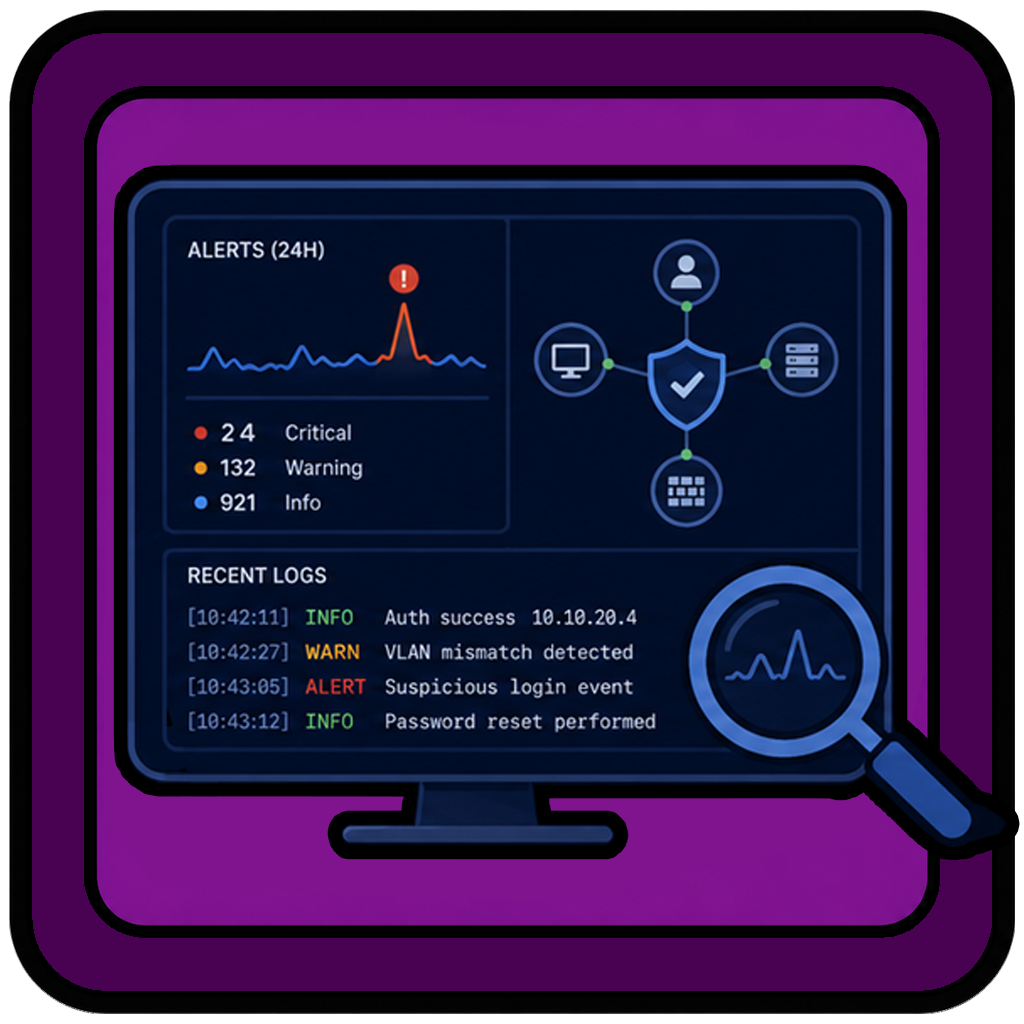
This project builds a hands-on security monitoring environment using Wazuh SIEM, endpoint detection agents, and structured firewall logging to create actionable dashboards to improve visibility across a homelab network.
Wazuh Security Monitoring
This project builds a hands-on security monitoring environment using Wazuh SIEM, endpoint detection agents, and structured firewall logging to create actionable dashboards to improve visibility across a homelab network.
Why is this needed?
This project was created to develop practical experience with security monitoring tools in a real environment. The goal is to understand how a SIEM collects, processes, and presents data, how endpoint detection systems behave in practice, and how to turn raw logs into useful insights to help identify and respond to potential security issues.
How does it work?
A Wazuh server is deployed to collect and analyze logs from multiple sources, including network devices and endpoints. Firewall logs from pfSense are forwarded into Wazuh, while agents installed on managed devices provide endpoint visibility. The collected data is then organized into searches, dashboards, and visualizations allowing patterns, anomalies, and security events to be identified more easily.
Project Directory:
Clicking any of the below links will take you to the relevant wiki page covering that topic in depth.
APPS
Serato Z2 Launcher
A simplified fix for people who use the Traktor Z2 with Serato DJ on Windows.
Serato Z2 Launcher
A simplified fix for people who use the Traktor Z2 with Serato DJ on Windows.
Why is this needed?
On Windows systems, Native Instruments runs the NIHardwareService in the background. This service can interfere with the Traktor Z2 when used with Serato DJ, causing issues such as:
- LED lighting not responding correctly
- MIDI messages returning incorrect values
How does it work?
The app runs a PowerShell script that manages the NIHardwareService automatically.
- Stops the NIHardwareService
- Launches Serato DJ once the service is stopped
- Runs in the background while Serato DJ is open
- After Serato DJ is closed, waits 60 seconds to allow all processes to exit
- Restarts the NIHardwareService
Installation
- Run the installer.
- Two shortcuts will be created, one on the Desktop and the other in the Start Menu.
- Optionally you can pin the shortcut to the Start Menu or taskbar for quick access.
Traktor Overlay
A customizable on-screen overlay that displays essential performance information missing from the Traktor Pro interface.
Traktor Overlay
A customizable on-screen overlay that displays essential performance information missing from the Traktor Pro interface.
Why is this needed?
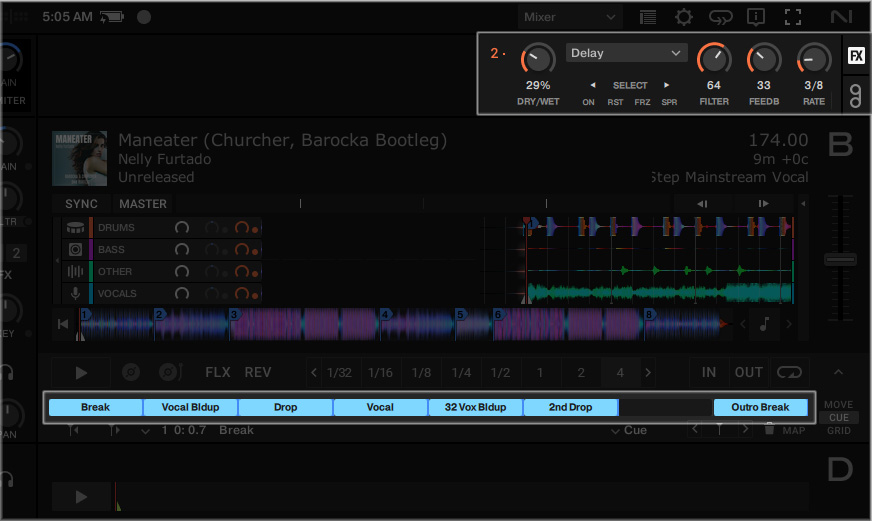
Traktor Pro does not display certain information within its software interface that is available on supported Native Instruments hardware controllers. This can make it difficult to monitor effect settings and other performance information when using a touchscreen, external display, or custom hardware setup.
Traktor Overlay provides this missing information directly on screen, allowing performers to view important controls and parameter values without relying on a specific controller display.
How does it work?
The application places a lightweight overlay above the Traktor Pro interface and updates its displayed values using information received from Traktor.
- Displays FX Unit information directly over the Traktor interface
- Shows effect parameter values
- Displays hotcue names
- Remains visible without interfering with normal Traktor operation
Planned Additions
- Preview Player controls
- Support for FX Units 3 and 4
- Group FX Mode support
- Pattern Player Mode support
- Touchscreen optimization
- User-configurable settings
- Support for additional screen resolutions
- Customizable overlay positioning and layouts
- Per-module enable and disable options
- Clickable hotcue labels and additional interactive controls
- Additional hardware mapping support
Installation
- Extract Folders:
Move the DesktopOverlay folder into: ..\Traktor Pro 4 - Overlay\Resources64\qml\Screens\
Move the S8 folder into: ..\Traktor Pro 4 - Overlay\Resources64\qml\CSI\ - Configure Display:
Set your desktop resolution strictly to 1920x1080. - Launch App:
Open Traktor and ensure the application window is fully maximized.
Add the stock S8 mapping via controller manager.

AIFtoAIFF
A lightweight app to bulk convert .AIF file extensions to .AIFF.
AIFtoAIFF
A lightweight app to bulk convert .AIF file extensions to .AIFF.
Why is this needed?
Different web shops such as Beatport and Bandcamp may use .AIF and .AIFF extensions interchangeably. Functionally, the files are identical, but having a consistent extension can make your music library cleaner and more uniform.
How does it work?
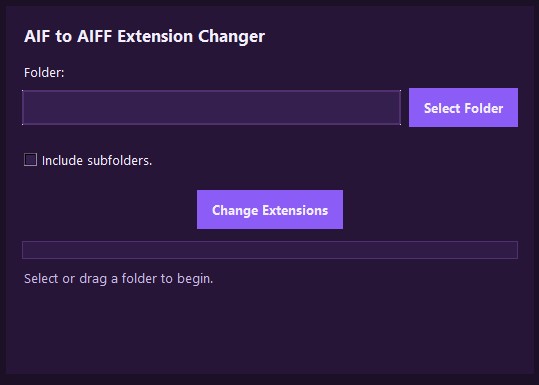
The application enumerates files in the selected directory (optionally recursively via os.walk), identifies filenames ending in .aif, and uses Python's os.rename() to batch rename their extensions to .aiff without altering file contents.
- Use the Select Folder button to choose your music folder, or drag and drop a folder anywhere into the app.
- Enable Include subfolders to apply the change recursively, or leave it unchecked to process only the selected folder.
- Click Change Extensions.
- All .AIF file extensions in the selected folder(s) will be updated to .AIFF.
Loading source...

NMLtoCSV
A lightweight app to convert Traktor playlists from NML to CSV format.
NMLtoCSV
A lightweight app to convert Traktor playlists from NML to CSV format.
Why is this needed?
Converting playlists to CSV can simplify the process of turning History Playlists into complete tracklists when sharing mixes. The CSV format is also easier to work with for other projects, such as generating reference tables for web applications.
How does it work?
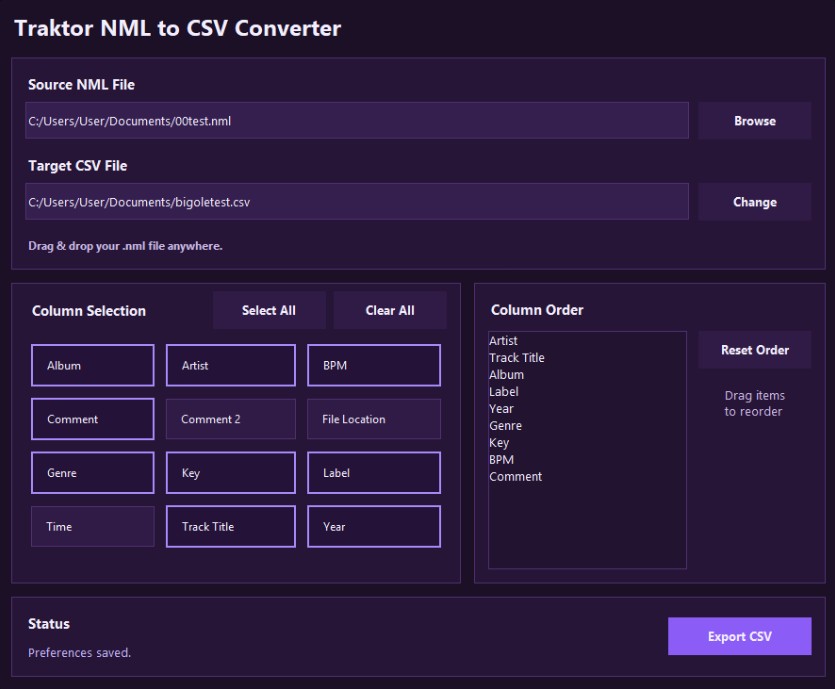
The application parses Traktor's NML (XML) database, extracts user-selected metadata plus optional embedded artwork from source audio files, then exports the results as a structured CSV.
- Use the Browse button to locate and load your NML playlist file, or drag and drop the file anywhere into the window.
- Leave the output file as the default, or click Change to choose a different folder and/or filename.
- Select which columns you want included in the CSV.
- Arrange the column order as needed.
- Click Export CSV to generate your file.
Does the app maintain persistence?
Yes. Your preferences are automatically saved and restored the next time you open the app. Preference storage currently uses the Windows AppData directory.
Loading source...